


You are using an out of date browser. It may not display this or other websites correctly.
You should upgrade or use an alternative browser.
You should upgrade or use an alternative browser.
Stephens State Park Conditions
- Thread starter pedals
- Start date


Do you need to have a Trailforks membership to submit a report that would be useful to the trail maintenance crews? How do the crews access the reports? I'm just trying to understand how these locations and conditions are communicated.
Nope, free members can submit reports all the same. It's all publicly posted...you can go on the map now and see reports outstanding. On the sidebar on this thread if you click one of the Orange icon trails, then to go to reports you see all the outstanding issues that exist.
Planning on clearing any of those that are old issues as well so we know exactly what is currently present in the park.

chainsawer
Well-Known Member
I entered via the Saxton Falls access and did a loop that covered the "White Rumbly climb" (to get the one at the bottom of Hally Toe, and another just beyond it) , then out to the one near Sunset, then back to the "unmaintained sandy rubbled woods road", White (to clear a bonus blowdown and the one at the top of Tally Ho), and finished with a sweep of "Pots N Pans". Attached a screenshot of the issues cleared (red waypoints).
I wanted to get to the last two known stragglers in the park (one on "Round the Firetower" and one on the "Morris Canal Greenway") but my aching knee had other plans.
I wanted to get to the last two known stragglers in the park (one on "Round the Firetower" and one on the "Morris Canal Greenway") but my aching knee had other plans.
Attachments

chainsawer
Well-Known Member
I suspect I'm gonna have to revisit this. I cleared what I saw at the very bottom of Hally To. Did not notice it crossing the trail elsewhere. And I didn't actually traverse Hally toe. After I cleared what I saw, I just proceeded up the rubbly climb to chase after other stuff.I saw this tree as well. It crosses the trail in 3 places near the bottom of Hally Toe
Please let me know if Hally toe needs a little more help.

Over the Bars
Well-Known Member
It crossed the next two switch backs at the bottom of halley toe just above the one you cleared.I suspect I'm gonna have to revisit this. I cleared what I saw at the very bottom of Hally To. Did not notice it crossing the trail elsewhere. And I didn't actually traverse Hally toe. After I cleared what I saw, I just proceeded up the rubbly climb to chase after other stuff.
Please let me know if Hally toe needs a little more help.
chainsawer
Well-Known Member
I did another round at Stephens today to finish up. I started at Firetower road to access a big one on "Round the Firetower'. (See pics below). Then from Saxton Falls, I revisited the bottom of Hally Toe to get parts B & C of the tree that I didn't fully clear yesterday. Felt a bit like an idiot for not figuring that out the first time. LOL . Then from Continental drive, I got a few along "Morris Canal Greenway". Happy to say "all caught up" with known issues in Stephens...
Attachments


Thank you!I did another round at Stephens today to finish up. I started at Firetower road to access a big one on "Round the Firetower'. (See pics below). Then from Saxton Falls, I revisited the bottom of Hally Toe to get parts B & C of the tree that I didn't fully clear yesterday. Felt a bit like an idiot for not figuring that out the first time. LOL . Then from Continental drive, I got a few along "Morris Canal Greenway". Happy to say "all caught up" with known issues in Stephens...

Nice work!!I did another round at Stephens today to finish up. I started at Firetower road to access a big one on "Round the Firetower'. (See pics below). Then from Saxton Falls, I revisited the bottom of Hally Toe to get parts B & C of the tree that I didn't fully clear yesterday. Felt a bit like an idiot for not figuring that out the first time. LOL . Then from Continental drive, I got a few along "Morris Canal Greenway". Happy to say "all caught up" with known issues in Stephens...

FitmanNJ
Well-Known Member
Ok, so I saw a downed tree on the "Red Perimeter" trail at Chimney Rock, photographed it from TrailForks, and saved the "Report." I see that the photo (actually, I guess I inadvertently posted the photo several times...) appears in one of the "Red Perimeter" tabs (with a yellow symbol beside it) in the MTBNJ Chimney Rock thread. The photo doesn't seem to be marked geographically, though, so that someone with a chainsaw could easily find the location.Nope, free members can submit reports all the same. It's all publicly posted...you can go on the map now and see reports outstanding. On the sidebar on this thread if you click one of the Orange icon trails, then to go to reports you see all the outstanding issues that exist.
Planning on clearing any of those that are old issues as well so we know exactly what is currently present in the park.
Am I missing something? Is there something more I need to do when I complete a report in Trailforks? As it stands now, it seems like someone might have to walk much of the "Red Perimeter" trail to find the downed tree unless they recognized the location from the photo. I'm a Karoo user, so I'm not too familiar with the Trailforks system. Thanks!
Ok, so I saw a downed tree on the "Red Perimeter" trail at Chimney Rock, photographed it from TrailForks, and saved the "Report." I see that the photo (actually, I guess I inadvertently posted the photo several times...) appears in one of the "Red Perimeter" tabs (with a yellow symbol beside it) in the MTBNJ Chimney Rock thread. The photo doesn't seem to be marked geographically, though, so that someone with a chainsaw could easily find the location.
Am I missing something? Is there something more I need to do when I complete a report in Trailforks? As it stands now, it seems like someone might have to walk much of the "Red Perimeter" trail to find the downed tree unless they recognized the location from the photo. I'm a Karoo user, so I'm not too familiar with the Trailforks system. Thanks!
Was this roughly where it was?
FitmanNJ
Well-Known Member
Yes, but I don't see a map with a pin in it on my version. Here's a screen capture from when I click on the "Red Perimeter" link with a yellow report symbol (photo but no map):Was this roughly where it was?View attachment 278713
Could it be because I submitted the photo (and already know where it was taken)?
chainsawer
Well-Known Member
I'm failing to see how this method of reporting/tracking in Trailforks helps the Sawyer/Maintainers get the job done. Sorry, IMHO Trailforks is just not delivering the goods. The platform is strong and has potential, but not currently ringing the bell.Ok, so I saw a downed tree on the "Red Perimeter" trail at Chimney Rock, photographed it from TrailForks, and saved the "Report." I see that the photo (actually, I guess I inadvertently posted the photo several times...) appears in one of the "Red Perimeter" tabs (with a yellow symbol beside it) in the MTBNJ Chimney Rock thread. The photo doesn't seem to be marked geographically, though, so that someone with a chainsaw could easily find the location.
Am I missing something? Is there something more I need to do when I complete a report in Trailforks? As it stands now, it seems like someone might have to walk much of the "Red Perimeter" trail to find the downed tree unless they recognized the location from the photo. I'm a Karoo user, so I'm not too familiar with the Trailforks system. Thanks!
I don't know where to begin with my whining, because it becomes TLDR. I've been using software since 1985, I have a sense of when something is bloated and overcomplicated. I'm also a grumpy old man, with leanings toward being a luddite, and I've had enough of fighting with software in my lifetime. But that aside, I/We need a few things out of TF:
1.) For Random Reporting by Any Rider: A simple button. Any rider can come across a tree. They press the button. The button enacts a camera and a small area for additional notes. Click the camera icon, take a pic of the issue, the image is planted onto a GPS enabled map so the location is absolute. It's of no help just to know there's an issue "somewhere" along a 4 mile trail. The ability to add issues later (while not on trail) is also important.
2.) For Maintainers. Maintainers can 'join" an issue tracker map. The maintainers have read/write access to the issues, so they can delete once cleared, or add issues, notes, adjustments, etc. The map is visible to all within the maintainer group, with "live' updates.. The map is GPS enabled so we can pull it up on a smartphone and navigate to the issue in real time. The issues are expandable so the image and notes can be seen. The map should be zoomable so it shows all the issues at once. The map can also be populated with other notable info, like best access points. (color coded).
Our current method more or less fakes this in a stupidly complicated and klunky way. Rider's screenshots of pins are gathered and inserted into my own list of waypoints on my own TF map. See example attachment. The pics are helpful to know what's going on but don't actually enter my map. My own map allows me to navigate in real time to issues. To share progress with other maintainers and you all, I take screenshots of my map. This of course, loses all the native GPS data. As an issue reporter, it's very laborious and annoying to reconcile GPS pins with Images after a ride. If you hit one or two issues, no big deal. but if you find 10 issues, it's a fucking disaster.
I want to take the TF programmers, strap a 40lb chainsaw pack to their backs and make them follow me for a day. I'd actually love to work face to face with the programmers to develop something better than the status quo.
Attachments

Last edited:
1.) For Reporting: A simple button. Any rider can come across a tree. They press the button. The button enacts a camera and a small area for additional notes. Click the camera icon, take a pic of the issue, the image is planted onto a GPS enabled map so the location is absolute. It's of no help just to know there's an issue "somewhere" along a 4 mile trail. The ability to add issues later (while not on trail) is also important.
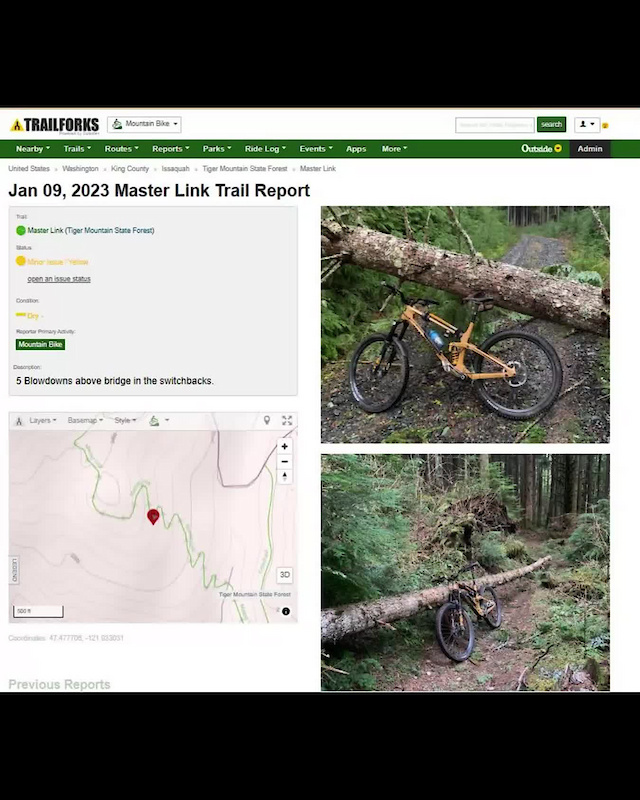
This is exactly how it works. See: my screenshots from the other day. It saves your GPS coordinate location on the trail and pins it to there. You Press the "+" button on the app, it opens up the page where you can add a picture and notes. Here's a better video at showing you the process.
How To Submit A Trail Report And A Trail Work Report With The Trailforks App Video - Pinkbike
This short video clip demonstrates how to submit a geo-tagged trail report, and a trail work report, with the Trailforks App when you are out on the trails.
2.) For Maintainers. Maintainers can 'join" an issue tracker map. The maintainers have read/write access to the issues, so they can delete once cleared, or add issues, notes, adjustments, etc. The map is visible to all within the maintainer group, with "live' updates.. The map is GPS enabled so we can pull it up on a smartphone and navigate to the issue in real time. The issues are expandable so the image and notes can be seen. The map should be zoomable so it shows all the issues at once. The map can also be populated with other notable info, like best access points. (color coded).
This is exactly how it works. See: this issue map full of reports from High Mountain:
These are GPS coordinated reports, not generically placed on the trail. The report @FitmanNJ did before placed it where he was.
I don't understand what's clunky about this? This seems about as straight forward as you're asking.
Yes, but I don't see a map with a pin in it on my version.
We may have uncovered the issue map may be a premium feature which would be unfortunate. But it's there for me at least.
Last edited:
chainsawer
Well-Known Member
The issue tracker map not accessible from the app. I have the pro version.This is exactly how it works. See: my screenshots from the other day. It saves your GPS coordinate location on the trail and pins it to there. You Press the "+" button on the app, it opens up the page where you can add a picture and notes.
This is exactly how it works. See: this issue map full of reports from High Mountain:
View attachment 278720
These are GPS coordinated reports, not generically placed on the trail. The report @FitmanNJ did before placed it where he was.
I don't understand what's clunky about this? This seems about as straight forward as you're asking.
We may have uncovered the issue map may be a premium feature which would be unfortunate. But it's there for me at least.
The issue tracker map not accessible from the app. I have the pro version.
That appears to be true but I can see it from the mobile browser version
chainsawer
Well-Known Member
So then it's practically useless for my needs in the field.That appears to be true but I can see it from the mobile browser version
View attachment 278726
View attachment 278727